Every logistics team has lived this moment. A truck pulls away from the dock half-empty, while another shipment sits back at the warehouse waiting for “the next available vehicle.” It doesn’t matter if you’re moving palletized FMCG goods or industrial equipment — the picture looks the same on a busy dispatch day: someone eyeballing a load, rounding up the numbers, and hoping it fits. Do this a few hundred times a year across a fleet, and a small inefficiency quietly turns into thousands of dollars in wasted freight spend. According to Gartner’s Future of Supply Chain Survey of nearly 1,000 supply chain professionals, 60% of chief supply chain officers say faster more accurate, and more consistent real-time decision-making is now a top priority — and a lot of that pressure comes down to one question planners ask every single day: how do you fit the right goods onto the right vehicle without guessing?
This is exactly the gap that SAP TM Load Planning was built to close.
For organizations running SAP Transportation Management (SAP TM), load planning isn’t a side feature — it’s the piece of the process that turns a transportation plan on paper into something a driver can actually execute at the dock. This blog walks through what SAP TM Load Planning does, how it works under the hood and why it keeps showing up as one of the highest ROI capabilities in an SAP TM implementation.
What Is SAP TM Load Planning?
At its core, load planning in SAP TM is the process of determining how goods — pallets, cartons, containers — should be physically arranged inside a transportation resource such as a truck, trailer, or container, in a way that respects space, weight, and legal constraints.
SAP TM offers two flavors of this: manual load planning, where a planner arranges items visually, and automatic load planning (also called load optimization), where the system’s load optimizer engine builds the plan for you. The optimizer looks at the height, width, length, and weight capacity of the loading space. For vehicles with two axle groups, it goes a step further and checks maximum axle load too — because a truck can be within its total weight limit and still be illegal to drive if the weight is not distributed correctly across the axles.
This is where SAP TM logistics planning starts to feel less like software and more like having an experienced dispatcher on every shift, one who never gets tired of doing the math.
Why Load Planning Deserves More Attention Than It Gets
Most companies don’t actually struggle with the concept of transportation planning. Where they struggle is the last-mile detail — the part where a plan built in a spreadsheet meets the physical reality of a loading dock.
Without structured SAP TM freight management, planners typically rely on experience, rough estimates, or Excel-based calculations to decide what goes where. That works, until it doesn’t. A slightly miscalculated pallet stack, an underestimated weight distribution, or a route planned without checking cube utilization can lead to:
- Part-loaded vehicles that inflate your cost-per-shipment
- Rework at the dock when items don’t physically fit as planned
- Axle overload violations that carry real legal and safety risk
- Delivery delays caused by last-minute replanning
Good freight load optimization isn’t really about squeezing in more boxes. It’s about removing the guesswork that quietly costs money at every single dispatch.
How SAP TM Load Planning Actually Works
Getting from “I have a truck and I have freight” to a system-generated, axle-compliant load plan happens in a few clear stages.
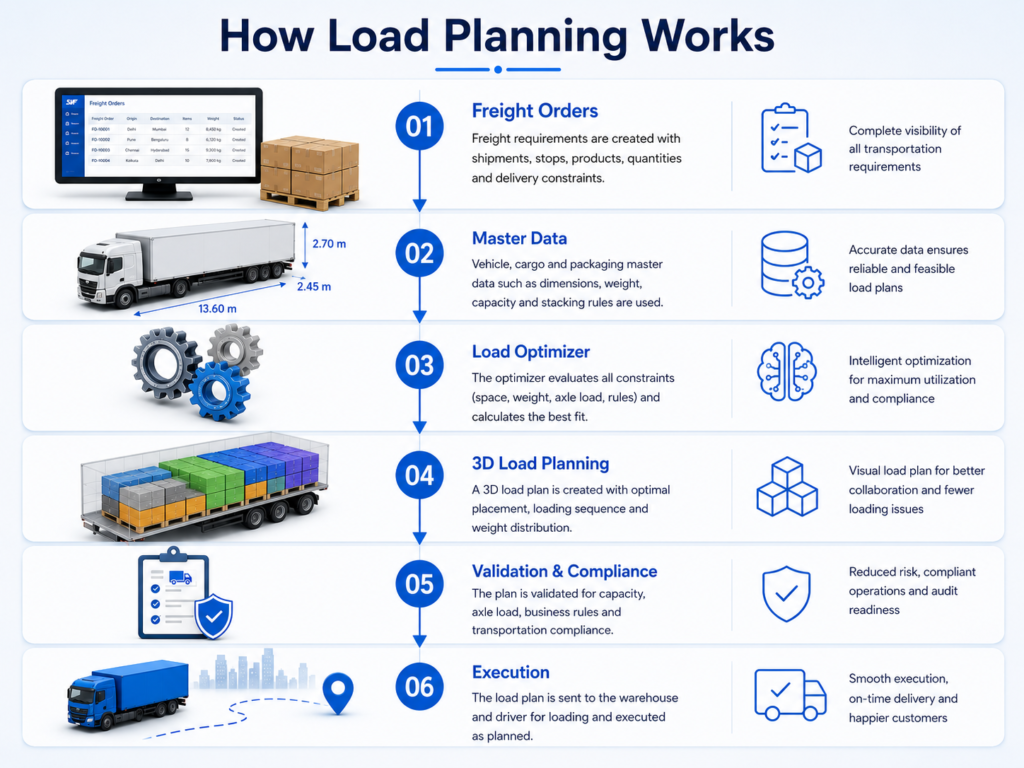
1. Master Data Comes First
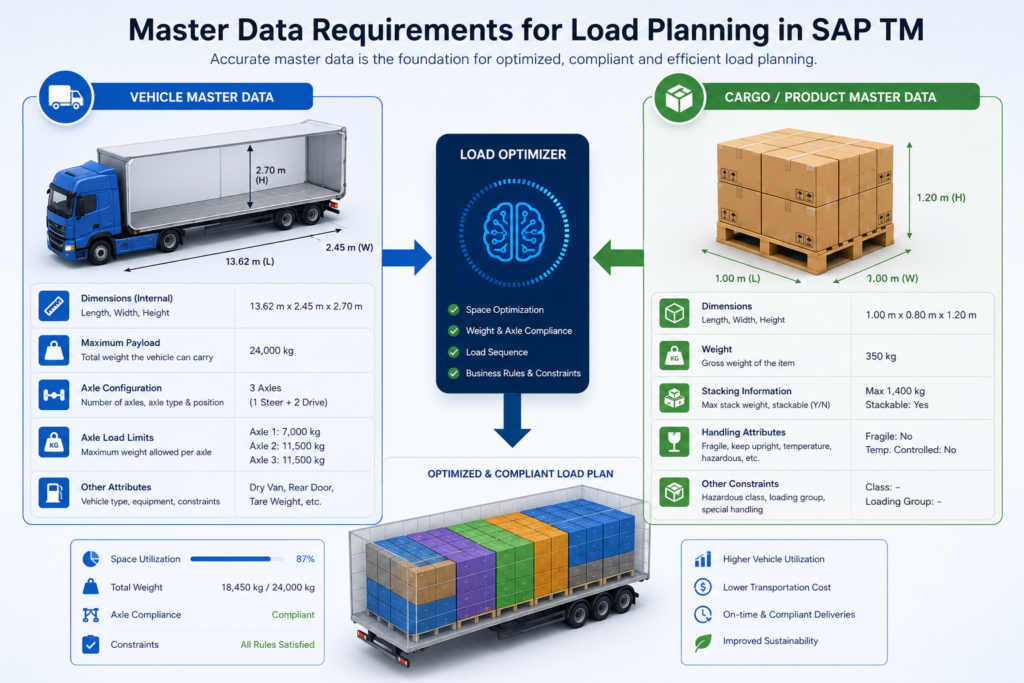
Before the optimizer can do anything useful, it needs accurate master data on both sides of the equation:
- Vehicle resource data: internal length, width, and height of the loading space, axle type and position, and maximum capacities.
- Cargo/product data: dimensions, weight, stacking rules, and any handling constraints (for example, no stacking on fragile items).
This is the unglamorous part of SAP TM implementation, but it’s also the part that determines whether the rest of the process actually works. A load optimizer is only as good as the data feeding it — get the dimensions wrong, and you’ll get a load plan that looks perfect on screen and falls apart on the dock.
2. Planning Profiles and Process Controller Strategy
Once the data is in place, load planning settings are tied to a planning profile, which in turn is assigned to a freight order type. This means different freight order types — say, domestic full truckloads versus multi-stop regional deliveries — can each follow their own load planning logic.
At the heart of this is the process controller strategy: a defined sequence of methods executed during load planning. Think of it as a rulebook that combines standard SAP logic with any custom rules your business needs. Rules can be prioritized, tested in isolation, or temporarily deactivated — which is particularly useful when you’re fine-tuning a new SAP TM transportation planning setup and want to see how each rule change affects the outcome.
SAP TM also lets you define different rule sets depending on resource type — general rules for all vehicles, rules specific to box trucks, rules specific to trailers and semitrailers, and even separate rules for the upper and lower decks of double-deck trailers.
3. The Optimizer Builds the Plan
With master data and rules in place, the load optimizer takes over. It calculates how to fit business document items (freight units, packages, products) into the available loading space, working within:
- Weight and volume constraints
- Maximum axle load (for applicable vehicle types)
- Loading sequence requirements
- Any custom stacking or placement rules
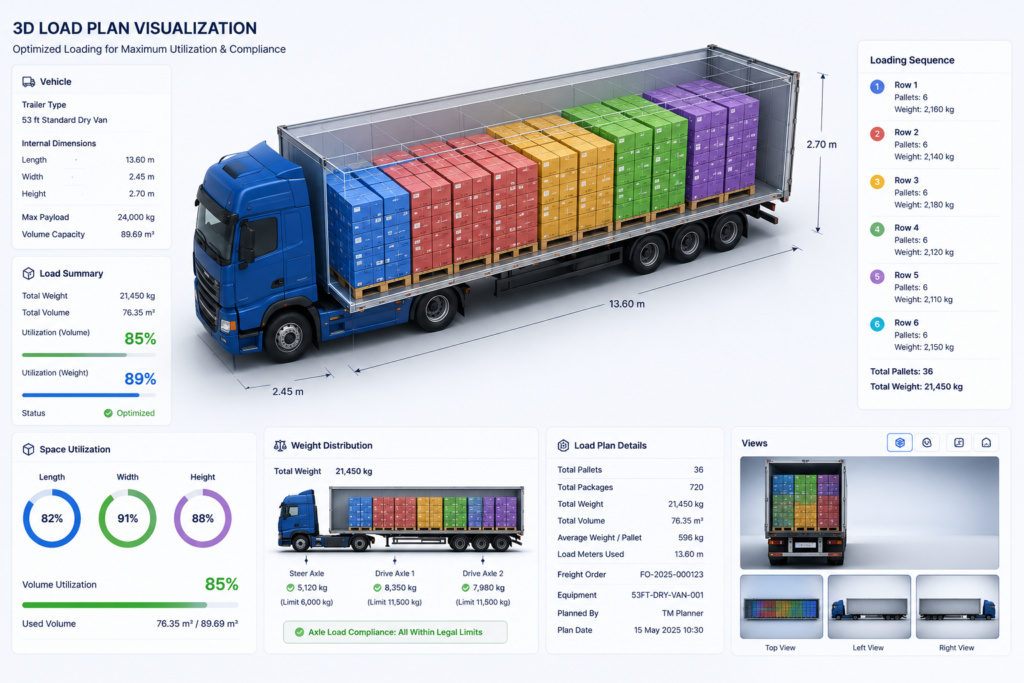
The result is expressed using a stack-row-line coordinate system: packages stacked on top of each other form a stack, packages placed side-by-side form a row, and packages placed front-to-back form a line. This structure is what allows SAP TM to describe an exact loading position for every single item — not just “it fits,” but precisely where it fits.
4. Visualizing and Adjusting the Load Plan
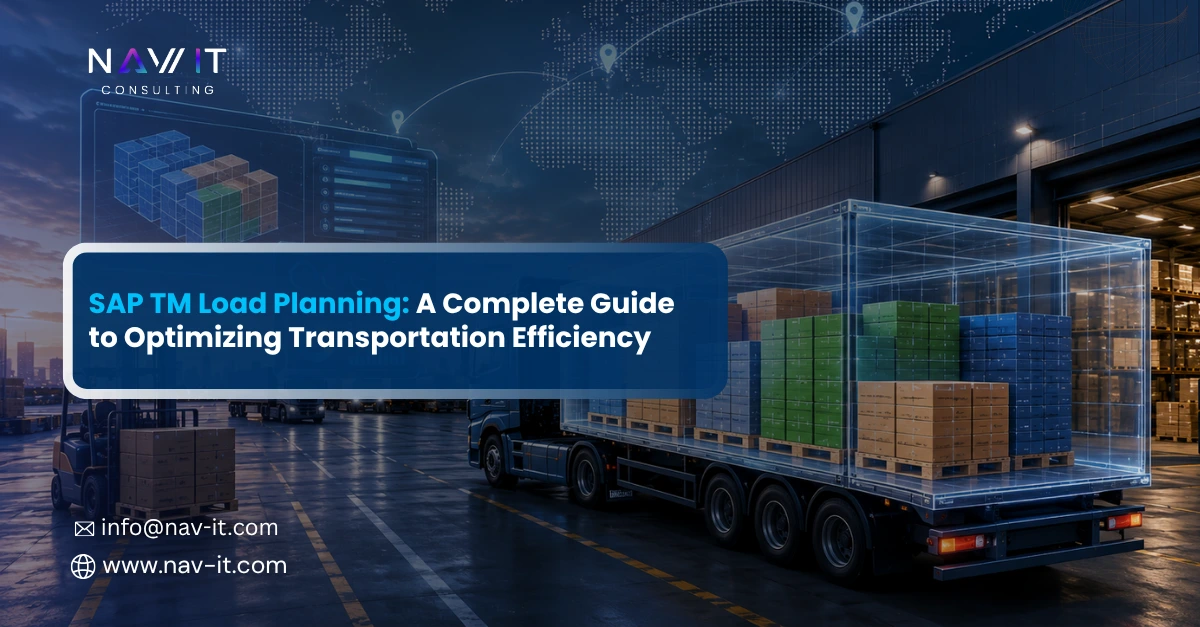
This is arguably where SAP TM load optimization becomes genuinely useful for day-to-day operations. The output — the load plan — can be viewed in two ways: as a hierarchical table, or as an interactive 3D model that planners can rotate, inspect, and manually adjust.
If a package doesn’t fit the way the system suggested, maybe due to a real-world constraint the master data didn’t capture — planners can unassign it, split it into separate freight units, and re-adjust directly in the planning cockpit. The 3D view can also be color-coded by destination or other attributes, making it easier for warehouse teams and drivers to understand loading instructions at a glance, without needing to interpret a spreadsheet.
For businesses that want to extend this further, the load plan integrates natively with SAP EWM (Extended Warehouse Management), or can be exported to Excel for sharing with co-packers, cross-docking partners, or external carriers who may not have direct SAP TM access.
The Business Case: Why Load Planning Pays for Itself
Step back from the mechanics for a second, and the commercial case gets pretty easy to make.
Vehicle cube and weight utilization directly impacts your cost-per-shipment. A truck running at 70% capacity instead of 95% doesn’t just look inefficient on a report — that gap compounds trip after trip, into real recurring cost. Structured SAP TM load planning closes it by making full utilization the default outcome of planning, instead of something that depends on how experienced the planner on shift happens to be.
Transportation cost reduction matters here too, beyond just fuel and per-trip cost.Fewer part-loaded vehicles mean fewer total trips, which means lower fleet wear, lower driver-hours consumption, and a smaller carbon footprint per unit shipped — increasingly a factor in how enterprises report and manage supply chain sustainability.
Compliance is a bigger deal than most planners assume, too. Axle load violations aren’t only an efficiency problem; get pulled over with an overloaded axle and it’s a legal and safety issue, full stop. Automated vehicle load planning that factors in axle weight distribution keeps non-compliant loads from reaching the road in the first place.
And then there’s plain speed. Manual load planning in Excel gets painfully slow once you’re consolidating multiple sales orders into a single transport. An automated optimizer turns hours of manual calculation into a near-instant, repeatable process, which frees planners up to actually deal with exceptions instead of running routine math all day.
Best Practices When Implementing SAP TM Load Planning
If you’re evaluating or rolling out this capability, a few practical lessons tend to separate the projects that work smoothly from the ones that stall:
Start with data discipline, not system configuration. The most common reason load plans “look right on screen but fail in practice” is inaccurate master data — vehicle dimensions that were never updated, or product dimensions that were entered as rough estimates. Get this right before you touch the optimizer rules.
Pilot on a narrow, well-understood scope. Rather than configuring load planning across every freight order type on day one, start with a single, representative scenario. Validate the rule logic against real operational exceptions, not just clean workshop examples.
Assign clear ownership for master data post-go-live. Load planning quality tends to erode slowly, not suddenly. Someone in your organization needs to own the ongoing accuracy of vehicle and product master data, or the process gradually drifts back toward manual correction.
Treat load planning as part of a chain, not a standalone feature. It connects directly to freight unit building, transportation cockpit planning, and — downstream — settlement accuracy. Designing it in isolation from these adjacent processes tends to create friction later.
Decide early how much automation you actually need. Not every business requires the full 3D Package Builder and advanced optimizer capabilities (some of which sit in SAP Advanced TM and require separate licensing). For simpler, more standardized freight, a lighter configuration may deliver most of the value at a fraction of the complexity.
Where This Fits Into Your Broader SAP TM Strategy
SAP TM logistics planning doesn’t operate in a vacuum. Load planning sits downstream of freight unit building and vehicle scheduling and routing (VSR), and upstream of execution and settlement. When these pieces are designed to work together — consistent master data, aligned business rules, and clear process ownership — the entire transportation chain becomes noticeably easier to manage. Planners spend less time firefighting, warehouse teams get clearer instructions, and finance teams get settlement data that actually reflects what happened on the road.
Transportation management software decisions also tend to pay off or fall short here, not in the initial configuration workshop, but months later, when real order volumes and real exceptions start testing the design.
Common Questions Teams Ask Before Implementing Load Planning
Does load planning replace the transportation cockpit?
No — it works alongside it. The transportation cockpit is where planners manage freight units, orders, and resources at a broader level; load planning operates within that context to solve the specific problem of arranging cargo inside a chosen vehicle or container. You can trigger and review load plans directly from the cockpit or from the business document itself.
Is automatic load planning mandatory, or can teams still plan manually?
Both options exist side by side. Many organizations start with manual load planning to understand the tool and validate master data, then move to automatic optimization once they’re confident the underlying data is reliable. Even with automatic planning switched on, manual adjustment in the 3D view remains available for exceptions.
What happens when a planned load doesn't match reality at the dock?
That’s exactly why the manual adjustment capability exists.Planners can unassign a package from a vehicle, split it into multiple freight units, and rework the arrangement directly in the cockpit — without having to restart the entire planning cycle from scratch.
Do we need SAP Advanced TM to get value from load planning?
Not necessarily. Standard SAP TM load planning already covers weight, volume, and axle-load-based optimization for most road freight scenarios. The 3D Package Builder and some of the more advanced mixed-package and consolidation features sit in SAP Advanced TM and carry a separate license — worth evaluating only once you’ve outgrown what standard load planning offers.
A Quick Word on Warehouse and Transportation Integration
One detail that’s easy to overlook: load planning quality is rarely just a transportation problem. Warehouse and transportation integration plays a bigger role than most teams expect. If picking, packing, and staging in the warehouse don’t align with how loads are planned — for example, if pallets are built without regard for how they’ll later be stacked on a trailer — the optimizer is working with a disadvantage before it even starts.
Organizations that get the most out of SAP TM load planning tend to be the ones that also looked at their SAP EWM processes at the same time, ensuring that packaging, staging, and dock scheduling decisions are made with the downstream load plan in mind, not as a separate, disconnected step. Supply chain optimization conversations tend to expand beyond transportation alone for this same reason, because a change on the warehouse floor can meaningfully improve what’s achievable on the road, and vice versa.
Final Thoughts
SAP TM Load Planning takes one of the messiest parts of logistics — physically fitting freight onto vehicles — and turns it into something structured and largely automated. Done well, it improves freight capacity planning, brings down cost per shipment, and gives planners real confidence that what’s on screen will hold up at the dock.
The technology itself isn’t the hard part. SAP has invested heavily in making the optimizer capable and the visualization genuinely useful. The real work — and where most implementation value gets won or lost — lies in getting the master data right, designing rules around real operational constraints, and keeping the process connected to the rest of your SAP TM implementation rather than treating it as an isolated switch to turn on.
If your organization is evaluating SAP TM transportation planning or looking to get more out of an existing SAP TM setup, load planning is one of the areas where a focused, well-scoped project can deliver measurable results quickly. We’ve always believed that simple can be harder than complex — it takes real work to get the thinking clean enough that a load plan just makes sense to the person standing at the dock. That’s the approach we’ve brought to supply chain transformation projects with organizations like Ford, Cargill, and Vestas, and it’s the same one we’d bring to your SAP TM load planning setup. If you’d like to talk through where your current setup stands, we’re happy to help you figure out the next step.